
A goal-setting journal that leads to action
A goal setting journal app is most valuable when it connects reflection to action. Writing helps you name what you want; a next step keeps that insight from staying on the page.
Write the goal in ordinary language
Start with what you want and why it matters. Do not force it into a perfect productivity format. Then add the constraint: what is making this hard right now? You may discover the goal is too broad, the timing is wrong, or the first step is unclear.
For example: ‘I want to change careers, but I freeze when I think about the whole process.’ The next step could be ‘list three roles I am curious about,’ not ‘find a new job.’
Create a quest from the useful line
A good journal-to-action workflow preserves the thought behind the action. You should be able to return later and remember why this specific task mattered.
Review without rewriting your history
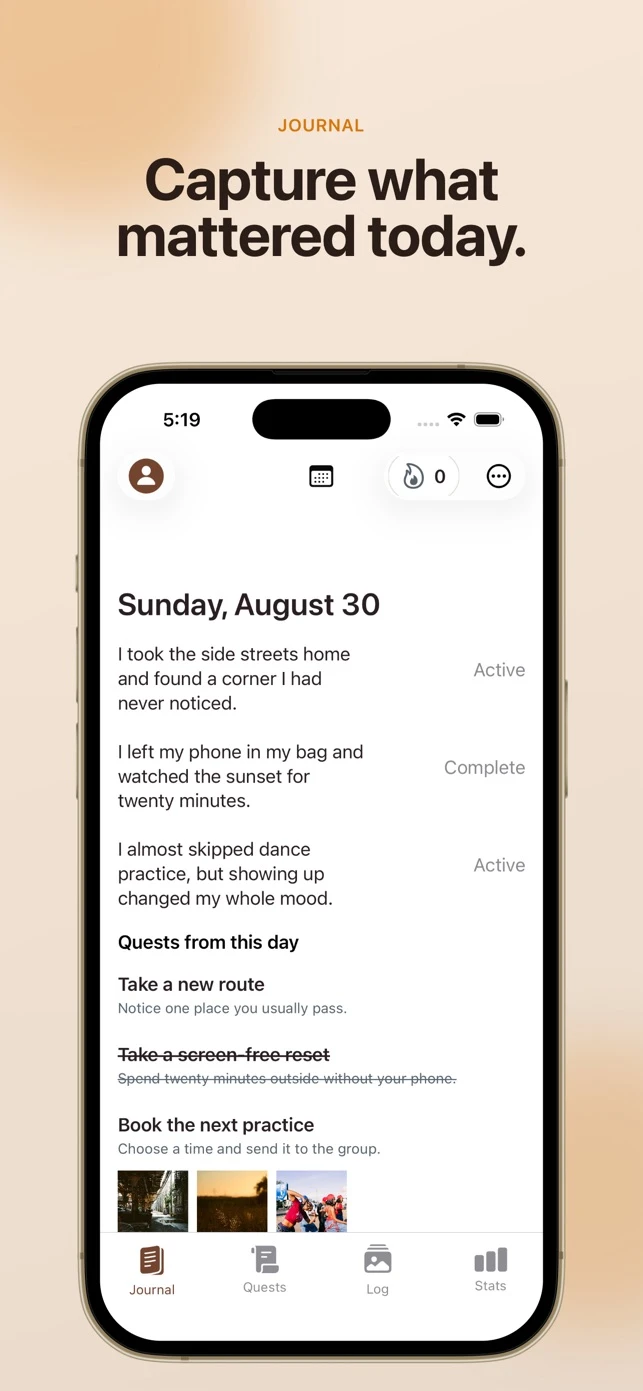
Use the calendar to revisit earlier entries and notice what changed. Keep your original words, then add a note after completing a quest. Over time, you get a record of both the goal and the smaller decisions that moved it forward.
Work through a goal without planning the entire project
Try this example: “I want to put together a small portfolio, but I keep waiting until every project is finished.” The useful next action could be choosing one piece of work to include. That is different from a vague task like “work on my portfolio,” because you can tell exactly when the choice is made.
Write the concern in Journal, then review the quest created from an eligible line. If the suggestion asks for more than you can do today, check its details before accepting. The point of the entry is to keep the original reason beside the action. Later, you can use the calendar to revisit what you wrote and consider which next step now makes sense.
What requires Guild Pass?
Full Journal access is included with Guild Pass, while daily quests are free. Do not assume every line will generate a quest. Accepted quests have time limits and eligible penalties may apply after introductory protection. Check the in-app subscription offer for current pricing.
Try it in Solo Quest XP
- Open Journal with Guild Pass and write what you want to work on. Add the obstacle or decision that has been stopping you.
- Use an eligible line to create a quest suggestion. Read its steps and check whether the action fits your situation before accepting.
- Complete the action before its timer ends, mark it complete, and revisit the entry through the calendar to remember the thought behind it.
Product details: Solo Quest XP on the App Store. Examples in this guide illustrate the method; suggested quests can differ.